Employee Monitoring Software
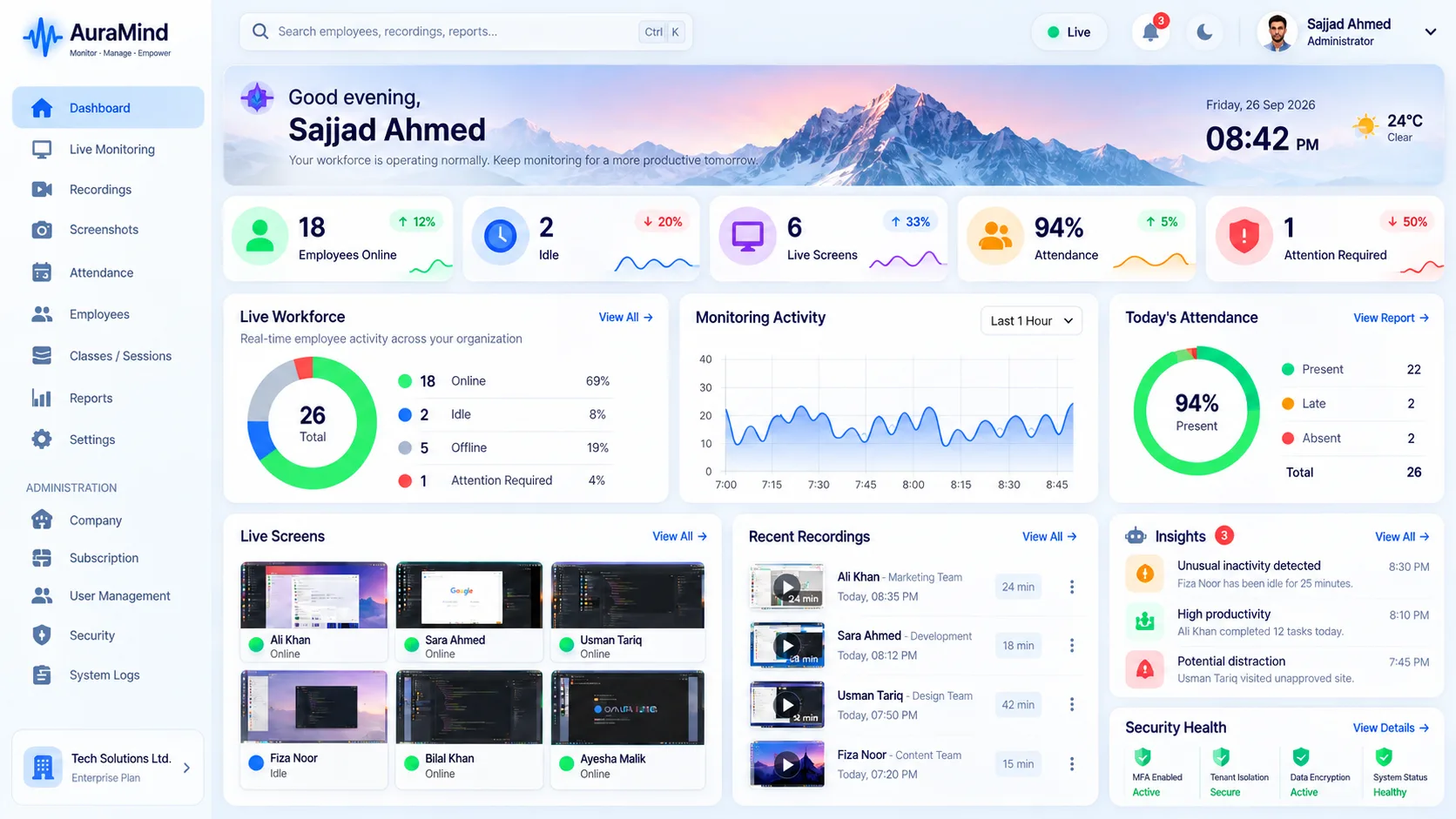
AuraMind PRO is a modern employee monitoring and workforce intelligence platform for office, hybrid and remote teams. See who is active, which work tools are being used, and where time goes — from one secure dashboard — without turning managers into full-time watchers.
Problems this solves
- No clear view of remote or hybrid workdays
- Time theft, buddy patterns and unexplained idle time are hard to spot fairly
- Managers rely on self-reported updates instead of evidence
- Security risks surface late, after files or data have already moved
Key features
Live screen & screenshots
See work as it happens with Live Team Wall, live screen view and periodic screenshots where your policy allows it.
App & website activity
Understand which applications and domains are used during work, categorised for productivity review — domain-level web visibility, not private content inspection.
Attendance intelligence
Track presence, active time and patterns alongside schedules so late starts and gaps are visible early.
Smart alerts
Get notified on unusual activity patterns so you review exceptions, not every minute of every day.
Benefits for managers and HR
- Replace guesswork with fair, evidence-based coaching
- Spot overload, burnout risk and blockers earlier
- Protect company data with earlier risk signals
- Give employees a clearer, more transparent view of expectations
Use cases
- Remote and hybrid teams that need proof of work without micromanagement
- Call centers and BPOs managing large, shift-based teams
- Agencies billing clients on tracked, verifiable work
- Operations leaders who need one view across departments
How AuraMind PRO approaches monitoring responsibly
AuraMind PRO is built for visibility without keyboard spying. It focuses on work signals — active time, applications and websites used for work, screenshots and live screen where permitted, attendance and workforce analytics — so managers can coach, remove blockers and protect the business without reading private keystrokes or personal messages. Deploy it transparently, tell employees what is collected and why, limit access by role, and review your local employment and privacy requirements before rollout.
Frequently asked questions
Is employee monitoring legal?
Laws vary by country and state. Monitor only company-owned devices or with proper notice and consent where required, publish a clear policy, and get local legal advice before deployment.
Does AuraMind PRO log keystrokes?
No. AuraMind PRO deliberately does not provide keystroke logging or email/chat content inspection. It focuses on work activity, applications, websites, screenshots and live screen visibility.
Can employees see what is monitored?
We recommend transparent deployment. Tell employees what is collected, why, who can see it, and how long it is retained.
How is this different from time tracking alone?
Time tracking records hours. Employee monitoring adds context — which work tools were used, activity patterns, screenshots or live view where permitted, and analytics that explain the hours.
Related guides
Workforce Monitoring Software · Live Screen Monitoring · What is employee monitoring software?
See AuraMind PRO on your own team
Tell us your team size and goals. We will configure the right seats, modules and secure access for a guided evaluation.
Request access → Explore employee monitoring